Growth
Refer-a-Friend
Give every family a personal referral link and reward them when a friend enrols.
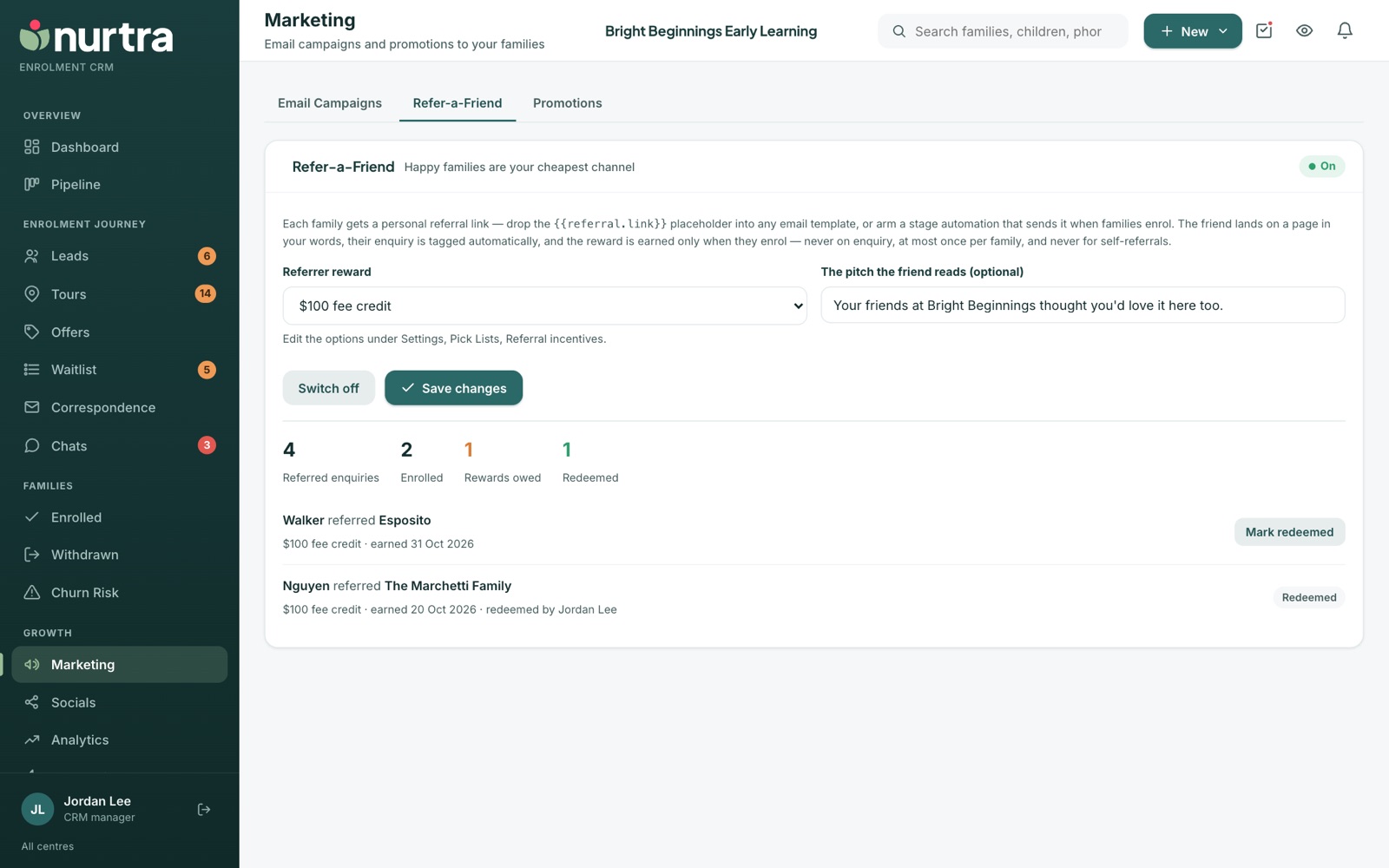
Set it up
- Go to Marketing → Refer-a-Friend.
- Choose the Referrer reward (for example a $100 fee credit, one week half-price, or a centre merch pack). Edit the options in Pick Lists → Referral incentives.
- Optionally write the pitch the friend reads on the landing page.
- Switch it on and Save changes.
- Add
{{referral.link}}to a template, campaign or the Enrolled stage automation to hand links out.
The rules
- The friend's enquiry is tagged as a referral and credited to the referrer automatically.
- The reward is earned only when the friend enrols: never on enquiry, once per family, and never for self-referrals.
- Earning a reward creates a task for the referrer's consultant.
- The ledger tracks referred enquiries, enrolled, rewards owed and redeemed.
Updated 2026-11-06 · nurtra.ai